Download Punjabi (Gurmukhi) font
Not all browsers will support Punjabi text (we recommend the free Mozilla Firefox browser). If you have not been able to see the Punjabi font on the web site, you can try downloading the font here. Once you have installed the font on your computer, you should be able to read the pages properly.
You only need to download this font and install it on your computer once. There is no need to download the font each time you visit this web site. These instruction are for Windows users (there may be slight variations in the procedure for different versions of Windows). Mac users may also install the font - check your help menu for details.
- Click here to download font
- When you have clicked, you will get a window requesting you to save the file. Save it to a directory on your hard drive. It will have the filename mfpun020.ttf.
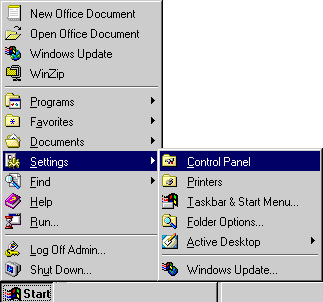
- Now go to the 'Start' menu, select Settings, then select 'Control Panel'.
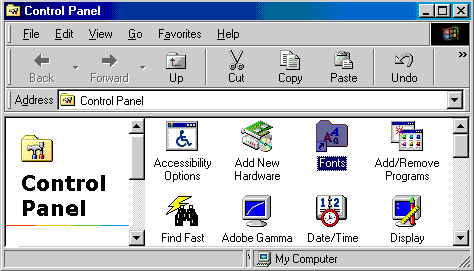
- In the 'Control Panel' window, double-click the 'Fonts' folder. It will show the list of fonts in your system.
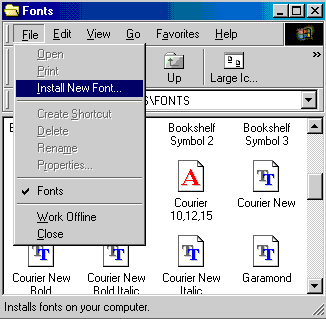
- Now you will install the 'mfpun020.ttf' font, which you have just downloaded. In the menu bar, go to 'File' and choose 'Install New Font'.
- You should get an 'Add Fonts' window. Select the directory where you saved the font file. It will show you a list of fonts.
- Choose 'GujratiLys 020' from the list of fonts. Click on the "OK" button in the window. This will install the font on your system.
- (Optional) You may also wish to switch on 'font smoothing' to improve the look of your font. To do this, open the 'Control Panel' window as described in step 3. Select the 'Display' icon. If there is a 'Plus!' tab, select this and check the 'font smoothing' checkbox. In some newer version of Windows, the 'Plus!' tab has been removed -- 'font smoothing' is found in the 'Effects' section of the 'Appearance' tab. If you are using an older version of Windows 95 that does not have the 'Plus!' features, you can download the font smoother from www.microsoft.com.
- Now go back to the web site -- everything should now be working correctly.
If you are still having problems even after downloading and installing the fonts, try using a modern browser such as Mozilla Firefox. The browser is free, and deals much better with Punjabi (Gurmukhi) fonts than Internet Explorer.
Technical Details
The font used is GurmukhiLys, a TrueType font, which uses the win-1252 character set to reproduce the Gurmukhi glyphs.